
All staff should be aware that there has been a recent increase in websites asking users to perform unknowingly malicious actions on their computers, such as using the keyboard shortcuts for copy and paste (Ctrl+C and Ctrl+V). This tactic is known as pastejacking, where malicious code is copied to your clipboard without your knowledge when you copy text from a website.
Example: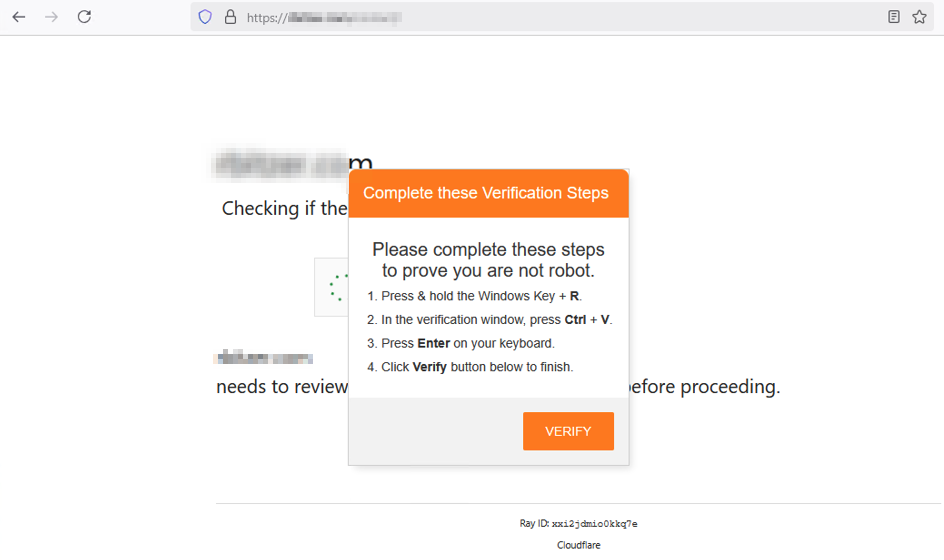
! Call to Action:
- Should a website display an unexpected prompt to use the shortcut keys for copy and paste, do not follow the directions and contact Technology Support.
- Alert Technology staff (TechSupport@hcpss.org or 410.313.7004) should your computer or files suddenly behave abnormally, such as:
- A website asking you to perform specific actions that are suspicious.
- Unexpected notes appearing on your desktop or within folders.
- Files once accessible become unreadable, icons change or display unfamiliar file extensions (typical example extensions include: .pdf, .png., .gif, .docx, .xlsx, .pptx, etc.).
- If you suspect an email in your account to be a phishing attempt, forward it to abuse@hcpss.org and not interact with the email by clicking on links or downloading files. Once reported, delete any suspicious emails.
- Learn how you can help support HCPSS’s cybersecurity efforts by accessing training resources and reading communications related to IT security efforts.
If you have any questions or need assistance, contact the Technology Support at TechSupport@hcpss.org or 410.313.7004.